Saturday, May 15

Teaching Limiting Factors & Carrying Capacity Simulation

I like to use online simulations but found it difficult to explain to my distance learning students what I wanted them to do.  I also wanted to check their understanding.  I made these steps for students to follow:

Go to: Phet Natural Selection Simulation Link

Click Intro


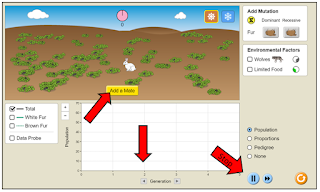
Use these settings: 

Click Add a Mate

Look at the chart at the bottom. Click the stop button at 2 Generations.


1. What happens to the # of rabbits after 2 generations (at the current settings)?

A. # of rabbits increases
B. # of rabbits decreases
C. # of rabbits stays the same


Click the reset button

Change the settings – choose Limited Food

Click Add a Mate

Click the stop button after 2 Generations


2. Compare your # of rabbits after 2 generations (at the current settings) to your 1st simulation.  What happened to the number of rabbits when food was limited?

A. # of rabbits increased
B. # of rabbits decreased
C. # of rabbits stays the same


Click the reset button

Change the settings – choose Wolves 

Click Add a Mate

Click the stop button after 2 Generations


3. Compare your # of rabbits after 2 generations (at the current settings) to your 1st simulation.  What happened to the number of rabbits when predators were added?

A. # of rabbits increased
B. # of rabbits decreased
C. # of rabbits stays the same


Click the reset button

Change the settings – choose a different season (Winter

Click Add a Mate

Click the stop button after 2 Generations


4.  Compare your # of rabbits after 2 generations (at the current settings) to your 1st simulation.  What happened to the number of rabbits when the climate is changed?

A. # of rabbits increased
B. # of rabbits decreased
C. # of rabbits stays the same


Click the reset button

Change the settings – choose a Dominant (brown fur)

Click Add a Mate

Click the stop button after 3 Generations and add Wolves


5. Compare the # of white and brown furred rabbits.  Which ones were eaten by wolves most often?


A. brown
B. white


6. TRUE or FALSE Limiting factors are sometimes helpful because they can keep the population from getting too large.


7. If there is more food than usual in an ecosystem, then...

A. Populations will stay the same
B. Populations will decrease
C. Populations will increase


8. If a disease destroyed the plants rabbits eat, what would happen to the population?


A. The rabbit population would stay the same
B. The rabbit population would infinitely increase
C. The rabbit population would decrease


9. What would happen if the population of wolves suddenly increased? How would it affect the rabbits in the ecosystem?

A. The rabbits would decrease due to more wolves eating them
B. All of the population of rabbits would increase
C. The biotic factors in the ecosystem would increase
D. The wolves predators would decrease


10. In a meadow ecosystem, which of the following is the best example of a limiting factor for a rabbit population?

A. Turtle Population
B. Sunlight
C. Grass available


Our school uses Schoology which self grades and gives students immediate feedback.  It could also work in Google Classroom.


Hope this helps your students too!

Saturday, January 23

Making Anchor Charts for the Classroom

Anchor charts are powerful visual aids in the classroom that support teaching and enhance student learning but in Science they can be hard to find or very expensive.  They may be outdated or not support exactly what you're teaching.  The answer.......  Make your own!

You can turn any page into a poster/anchor chart.


Here's how:
1. Save your page as a .pdf
2. Open the .pdf
3. Click print
4. Select poster
5. Choose your size
6. Print
7. Assemble

Hints:
I use white copy paper and color the pages before laminating.  
You can add bulletin board border to add some style. 
I use dry erase markers on the laminated sheets - it erases easily (except for red).

For online students: I share the 1 page .pdf during my Zoom conferences so we're all looking at the same thing.
I make sure there are anchor charts near lab stations.  I often see my students looking at the charts when they get "stuck" so I know they're helpful!  

Friday, January 15

How I Survived 1st Semester in a Pandemic!

😬 My 1st lie of the day when people ask how I am is - I’m okay.  In truth I’m not!

No college class, in-service training or 20+ years of experience prepared me to teach during a pandemic!  Our district model is to teach remotely and face to face at the same time while being tech support and digital lesson designer.


Here’s what worked for me:


1. Keep things simple

·  Make a routine – I have a warm-up and activity most days, at the end of a lesson there is an exit ticket

·  One platform/product for digital learners – Our school uses Schoology.  I combine videos and questions by splitting a video into segments (with Movie Maker, Video Editor or Photos app) and putting multiple choice, fill in the blank, true/false and matching questions in between the segments. If I don’t have a video, I add audio to PowerPoint slides and save it as mp4 then add guided notes or questions between slides, so students are interacting.  Less switching between apps & products means better focus and less chance for technical/technology issues!

2. Make a checklist

·  I actually print separate lists of in-class and virtual students with the assignments for the week.  At the end of the day, I check off the students that finished.  I use a different highlighter each day to mark assignments that are incomplete or missing.  It makes it easier to see what student I need to send a message to online or speak to in class the next day.

3. Don’t start from scratch, adapt

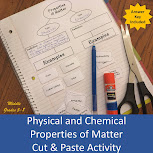
·  I start with the resources I have. For example, students need to know the properties of matter. In class we do a cut and paste where students sort physical and chemical properties. I adapted this for distance learners by making it drag and drop in Google/One Drive.


4. Use anchor charts

·  I summarize the lesson visually on a PowerPoint slide then print it as a poster for the classroom and share the slide on Zoom.  All students are able to see the same thing and it helps keep me on track with what I need to accomplish during the lesson. 


5. Make it fun!

·  Demos or Do it with us – I like Sick Science, there are lots of quick projects you can show, but also some that students can do in class and at home.

·  Games - Kahoot, Quizlet Live, Gimkit, Quizz

·  Puzzles - make a crossword, word find etc. (I like this site for online and this one to print)


My 2nd second lie, this will be over soon. Our state just announced we’ll be doing this until the end of the school year and really, we’ll have a digital component to any teaching from now on. No more snow days!


What’s working for you?

Sunday, April 5

Distance (digital) Learning

Our school as well as many others has now transitioned to distance (digital) learning. 

I want to keep the lessons interactive and engaging to students.  We like to do "cut and paste" activities so I designed new drag and drop activities.  They are similar to classroom activities and still easy to check for understanding!

Physical and Chemical Properties of Matter Drag and Drop Activity
Students differentiate between physical and chemical properties by dragging dropping terms such as color, density, oxidation, solubility and more.

Tides Drag and Drop Activity
Students drag and drop illustrations and information about causes, water levels, when each tide occurs and the moon phase.

Moon Phases Drag and Drop Activity
Students drag and drop and drop the moon phases in the correct order and label them.

Friday, March 13

Explaining the coronavirus (COVID-19) to Students

Show this video:
Where Do New Viruses Come From? by Stated Clearly

Ask students:
  1. How do viruses differ from other microbes?
  2. Why do most viruses only infect one type of host organism?
  3. How do viruses evolve to infect new hosts? 
  4. Could a virus come from a lab?
  5. Why is it called the coronavirus? 
  6. How is the virus treated?
  7. What can you do to stay safe? 

The video makes the virus about Science and less scary to students.  
It's also a good way to start a conversation about basic hygiene like washing your hands, covering your mouth when you sneeze etc.  

Saturday, August 10

Science Fact or Fiction?

If you have a few minutes left of class, this game is fun to play!

*Borders by Lindy du Plessis and fonts by Kimberly Geswein
1.  Divide students into teams.
2.  Read a question. Players have to decide whether the answer is Fact or Fiction.
3. The 1st team to say the correct answer earns a point.

Wednesday, August 7

Does your school use PLC's?

Our school does and it can be a challenge!  
I was inspired by this blogpost that summarizes industry research and the experiences of the educators, and gives guidelines  to implement PLCs.
I have been a part of a PLC for many years so I skipped down to "Author Tips" for establishing norms. These are a great example to start from:

(1) Be present and engaged. Laptops and multi-tasking are allowed as long as we make sure to be active in collaborations.
(2) Come prepared with materials and ideas. Be ready to work.
(3) Work hard until 4pm. Make sure to allocate one short break around 3pm.
(4) Open to all voices and opinions. Honor all “directions.”
(5) We are the leaders. We take ownership. Ask ourselves “what else can WE do?”
(6) Rely on one another for support and guidance.
(7) We remember Q-TIP (Quit Taking It Personally).

The other "Author Tip" that is important to keep in mind when working with PLC is that “Successful PLCs should use data to talk about and share teaching strategies."  

PLC's are not about one person planning - it is about everyone collaborating😊